I built an MCP server for SitecoreAI and connected it to Cursor. I wanted to see how far I could go with AI-assisted content authoring, not just asking questions about Sitecore, but actually creating pages, adding components, uploading media, and working with content.
If you are new to MCP, it is a standard way to give an AI assistant access to tools. The Model Context Protocol website explains it better than I can.
It started when I was trying Sitecore's Agentic Studio. I was expecting something closer to how a content author works, but I kept running into the same problems. There were no flows, and almost every time I asked it to do something, it wanted a page ID, component ID, or some other information that I had to find myself. It also did not check placeholders or insert options before trying to add components. Sometimes even a small task took a long time because it was going through many tools.
I wanted something different. If I ask an agent to create a page, it should first understand where the page will be created, what templates are allowed, which components can be used, and where they can be placed. Basically, the same things I would check if I was doing it manually.
SitecoreAI already has APIs for working with content, so I started looking at what I could use. There is GraphQL, which is well documented and gives you good control, but it is quite low-level for some tasks. For example, if you want to place a component on a page, you need to deal with rendering parameters yourself. Then there is the Agent API, which is designed more around creating pages and placing components. It makes these operations easier, but it is also newer, and I found some issues while working with it.
In the end, I decided to use both. The Agent API handles page creation and component placement, while GraphQL is used for mutations and reading specific fields when I need more control. From Cursor's point of view, this does not matter. The agent just sees a set of tools and decides which one to call.
One thing I was careful about from the beginning was what the agent is allowed to do. I registered only specific tools, and I intentionally did not include a delete tool. There is no publish tool either. I also wanted a confirmation step before creating a page, so the agent cannot just decide to build something and start writing items into Sitecore.
For now, everything is connected to development environments only. I am not planning to connect it to production until I am completely sure how it behaves.
Another thing I needed was support for multiple projects. I work with different Sitecore environments, and I did not want to maintain a separate MCP server for each one. Each project has its own host, credentials, and OAuth client, so I made the configuration environment-based.
MCP_PROJECTS=clienta,clientb,clientc
CLIENTB_SITECORE_HOST=https://clientb-instance.example.com
CLIENTB_SITECORE_API_KEY=your-api-key-here
CLIENTB_LABEL=Client B (staging)
Adding another project is just a matter of adding its ID and environment variables. There is no need to change the code. If credentials are missing, that project is skipped during startup instead of crashing the whole server.
Cursor starts the MCP server using stdio, but I also added HTTP support in case I want to use it from another application. With HTTP, the caller can select the project using a header or a /mcp/<projectId> URL.
Once I had the connection working, I started with page creation.
I did not want the agent to create a page immediately after receiving a prompt. Instead, it first checks the available insert options and proposes a page structure, including the template, components, and placeholders. I review the plan, and only after I confirm does it create the page.
After the page is created, it checks which components are allowed in each placeholder and then adds them in a separate step. Finally, it reads the page again to verify that everything was created correctly.
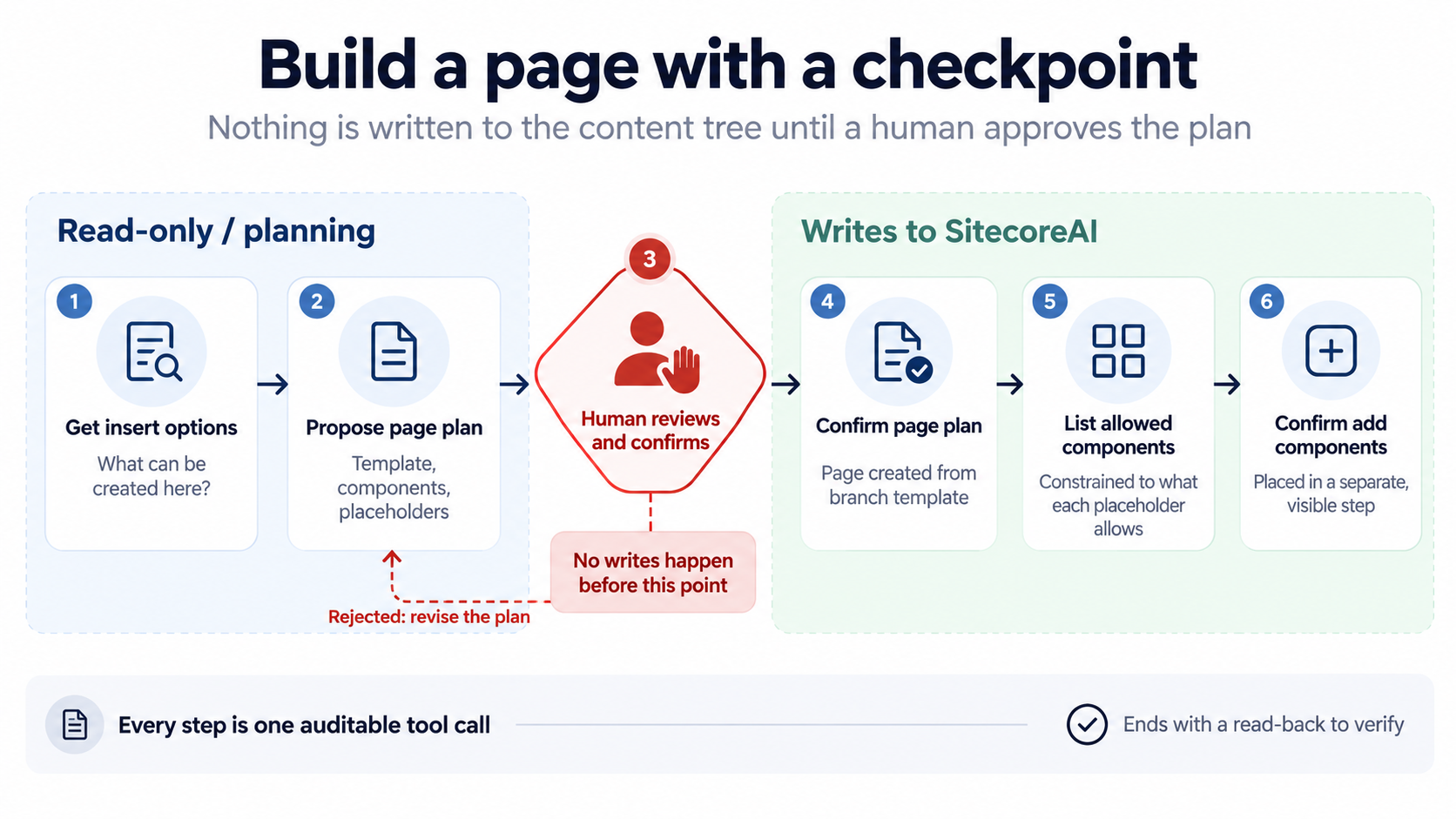
Checking insert options and placeholders every time was one of the main reasons I built this. I don't want the agent to guess where something belongs or assume that every component can be added everywhere.
Once page creation was working, I started adding tools for things I normally do during development.
One of them was managing SXA component styles. In SXA, styles are stored as Sitecore items and referenced from the rendering parameters in the layout XML. This is one of those areas where you need to be careful, because one wrong character in the layout XML can break all the components on the page.
I created two tools for this. The first one lists the available styles for a site, including styles inherited from a shared site. The second one takes a component instance ID and a list of style GUIDs and updates only the Styles= parameter. It leaves everything else untouched.
I also added a dry-run option, so I can see the exact before and after without saving anything. If the component ID is wrong, the tool stops before making changes. The dry run is optional, and although the agent is expected to use it, nothing technically forces it to do so.
There was also a small detail that confused me at first. The component instance ID is not the datasource ID. I was mixing these up until I started reading the actual component instances from the page.
The tool I probably use the most now is media upload.
I can point Cursor to a folder on my machine, tell it which Sitecore Media Library folder to use, and let it upload the images. The tool handles the MIME types and checks that the uploaded items are proper Image items.
I had an interesting case with SVG files. They were uploaded, but the alt text was empty and the dimensions were missing. I asked the agent to fix them, and it went through the files, read the width and height, and updated the corresponding Sitecore fields. This is exactly the kind of repetitive work where having an agent is useful.
After that, I started using it for more than just uploading images or creating a single page.
For example, when developing a component, I can ask it to generate pages with real content instead of lorem ipsum. I can have different combinations of background styles, images, and image positions, so I can see how the component behaves in different situations.
I also use it to generate documentation pages for components. It can create a page showing the available properties, styles, and variants, and I can even ask for a PDF based on that page.
Another use case is QA. Instead of explaining manually what needs to be tested, I can ask the agent to look at the page and help prepare specific test cases based on the components and content it finds.
I don't have exact numbers for how much time this saves, but for these repetitive tasks, it makes a big difference.
Of course, not everything worked as expected.
While building the MCP server, I found a few issues with the Agent API that were not mentioned in the documentation. Most of them only became visible when I started using the endpoints with real content.
One endpoint, for example, returns a preview URL with a second ? instead of &. This sounds like a small issue, but only the first question mark starts the query string. The rest becomes part of the parameter value, and the page ends up reporting a missing parameter even though it was included in the URL.
I worked around this on the client side by replacing every ? after the first one with &.
I also found a paging issue in an endpoint that lists child items. If you trust the response indicating that there are no more pages too early, you can end up with incomplete results without even noticing.
Another thing I initially got wrong was how the Agent API handles fields. I was using field IDs, as I normally would in raw Sitecore operations, but the Agent API expects field names.
These are small things, but they can take quite some time to investigate, especially when the API returns something that looks successful.
This is also why I made the agent read the content back after writing. In one run, the verification caught a connection that had timed out. Instead of reporting that everything was completed, the agent detected the problem and retried.
During testing, I also opened several support tickets with Sitecore.
One issue was that adding a component to a page does not respect the branch datasource. The child items defined under the root datasource item in the branch template are not created. Sitecore reproduced this and registered it as bug AI-10341 (CS0735801).
Another limitation is that the Agent API does not provide a way to target the shared layout when adding a component. This was registered as feature request AI-9025 (CS0735613).
I also found several issues with asset search. When a search returns no results, the API responds with a 404 instead of a 200 and an empty array. This was registered as bug AI-10434 (CS0735614).
Asset search also cannot be scoped to a specific site, path, or folder, which is a problem when working with multisite solutions. Sitecore registered this as feature request AI-10430.
And finally, asset search is limited to ten results without pagination. This became feature request AI-10431, together with a request to document the limitation.
The last two are especially relevant for my media upload workflow. If I want to check whether an image already exists in a specific folder, it is not very reliable when the search cannot be scoped to that folder and only returns ten results.
All these issues made me more careful about trusting the result of a tool call. Just because the API returns a response does not always mean the operation did exactly what I expected.
And this brings me to something I still find a bit uncomfortable about working with AI agents.
Sometimes it feels like talking to someone smarter and faster than me, who never gets tired and can go through tasks much quicker than I can. That is great, but it can also make mistakes at the same speed.
When an agent has access to tools that can change content, this is something you cannot ignore.
That is why my MCP server is still limited to development environments. There is no delete tool, no publishing, and page creation requires human confirmation. After writing content, the agent reads it back and checks the result.
Everything stays in the authoring database until a person decides what should go live.
I am still experimenting with this, and there are things I want to improve, especially around validation and making some of the safety checks mandatory instead of relying on the agent to follow instructions.
But even in its current state, it has become useful in my daily work. Not because it replaces content authors or developers, but because it takes care of many small and repetitive tasks that normally take time.
And I think that is where this kind of integration makes the most sense for now. Give the agent the right tools, let it do the repetitive work, but keep control over what it is allowed to change.