
This post is about Sitecore Search Sources — the embedded search functionality that powers integrated search inside Sitecore AI. It's pretty new and still rolling out to customers. If you're not familiar with Search Experiences and Search Sources yet, go through the Sitecore documentation on Search Experiences first — I won't go through the basics here since they're already covered there.
When we started building search using the new Search Sources functionality, the plan looked simple: one Sitecore Search index, done. It didn't stay that way for long.
Search sources are configured per environment. At the time we started, only one option was available — Content Sources, where you select a page template and map its fields. We had a call with Sitecore around that time, and they mentioned they were working on a way to configure a search source from the site's sitemap instead — Site Sources. A month later, in another call, they helped us enable it on our environment. That was a big step forward.
However, once we started using the SDK — version 0.3.0 at the time — we hit its limits: no facets or filtering exposed. The Sitecore team suggested we call the API directly instead.
Once we needed a header typeahead alongside a full faceted search page, per-site configuration, and the ability for content authors to pre-filter what a given search component actually searches over, one index and one way of calling the API wasn't enough. Here's how it evolved, plus what it took to get search sources working reliably.
Two indexes, two jobs
Instead of one index doing everything, we split search into two purpose-built sources, each identified by its own config GUID:
- A site index — the full-featured index behind the Resources/Global Search results page. It carries the rich metadata a results page actually needs: title, description, thumbnail, date, taxonomy.
- A suggestion index — a lean index behind the header's typeahead/autosuggest dropdown, where the frontend deliberately consumes only the title and a URL to link to, ignoring everything else the index contains.
Both are configurable per site rather than hardcoded globally, and both are queried through the same underlying Sitecore Search REST API — but the way the app talks to that API changed a lot over the life of the project.
Site index
This is the index behind the main Resources/global search page — the one that needs to render full result cards with facets and filters (Type, Industry, Topic, Solutions). Its default config is defined right on the Sitecore Search field, a Sitecore Search plugin field type that lets content authors visually bind an index and field mapping in the Content Editor:
{
  "searchIndex": "",
  "fieldsMapping": {
    "images": "page_thumbnail_meta",
    "description": "description_meta",
    "title": "title_meta",
    "type": "type"
  }
}
Documents returned from the site index carry a much larger shape:
interface SearchDocument {
  title: string;
  title_meta: string;
  description: string;
  description_meta: string;
  page_thumbnail: string;
  published_date: string;
  type: string;
  industry: string[];
  solutions: string[];
  topic: string[];
  sc_url: string;
  sc_item_id: string;
  sc_locale: string;
}
This is what powers the faceted filter UI, sorting, thumbnails, and pagination on the Resources/Search page.
Here's what the field configuration looks like on the Sitecore Search side, with each field's data type, whether it's searchable, filterable, or sortable, and the languages it's published for:
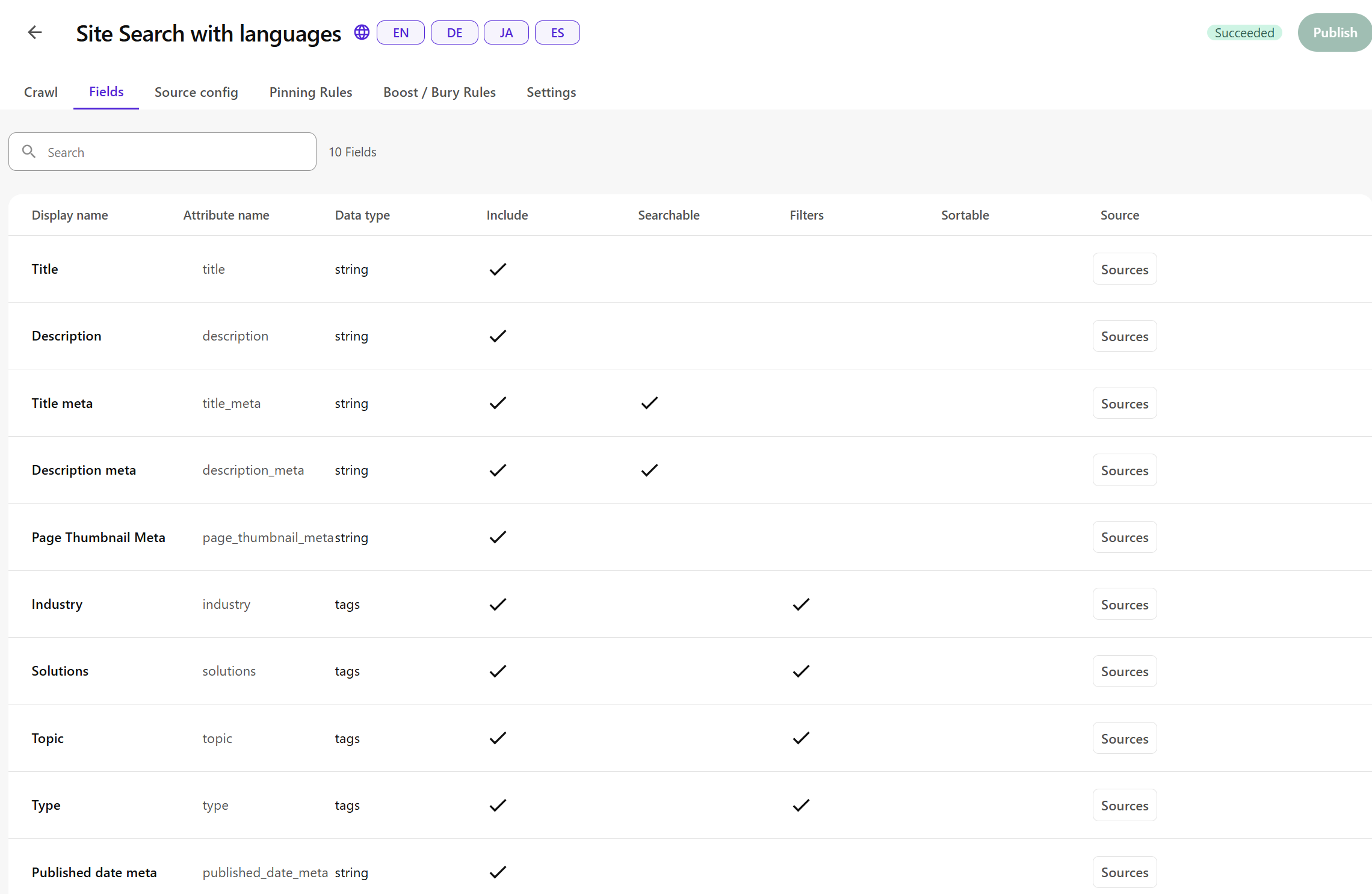
Suggestion index
This is a separate, deliberately narrow index used only by the header's typeahead dropdown.
Whatever fields the underlying Sitecore Search crawl produces for this index, the frontend only ever projects two of them out — title and URL — and drops the rest:
const suggestions: SuggestionItem[] = (data.content ?? [])
  .map((item: { title?: string; sc_url?: string }) => ({
    title: cleanTitle(item.title ?? ''),
    url: item.sc_url ?? '',
  }))
  .filter((s) => s.title && s.url);
That's the whole design: no descriptions, no thumbnails, no dates, no taxonomy — just enough to render a title-to-link row in a dropdown, kept intentionally cheap and fast.
Making both indexes configurable per site
Since sources are defined per environment, hardcoding one global index ID wasn't an option. Both index IDs, plus a "Global Search Page" pointer, live as fields on a SiteConfiguration Sitecore template:
SiteConfiguration
└── Search Parameters
    ├── DefaultSearchIndex
    ├── DefaultSuggestionSearchIndex
    └── GlobalSearchPage
These are pulled per site via a GraphQL query filtered by template and site root path, and exposed to the React tree via a context provider:
// SiteConfigurationsProvider.tsx
const { DefaultSearchIndex, DefaultSuggestionSearchIndex, GlobalSearchPage } =
  useSiteConfigurations();
The site header reads DefaultSuggestionSearchIndex straight out of this context and passes it down as suggestionConfigId to both the desktop search form and the mobile/expanded search panel, so each site on the platform points its typeahead at its own suggestion index without any code change. A component-level override still exists too: if a content author sets a specific index on a Search field for a given rendering instance, that wins over the site-level default.
Where we started: the Content SDK hooks
The project began using Sitecore's own React SDK for search, @sitecore-content-sdk/nextjs/search:
import { useSearch } from '@sitecore-content-sdk/nextjs/search';

const { total, totalPages, results, isLoading, isSuccess, isError, error } =
  useSearch({
    searchIndexId: searchIndex,
    page: pageNumber,
    pageSize,
    enabled: true,
    query: searchQuery,
    sort,
  });
This came with built-in analytics wiring via @sitecore-content-sdk/events, firing first-party search events back to Sitecore Cloud tied to page/site context. It worked, and it's a genuinely fast way to get search running out of the box. But it also meant every search interaction and result render was coupled to the SDK's internal data-fetching lifecycle and its assumptions about pagination, filtering, and event shape. That became limiting once we needed faceted filtering and a lightweight suggestion endpoint that didn't fit those assumptions — which is when the Sitecore team pointed us at the API directly.
The switch: calling the Sitecore Search REST API directly
We replaced the SDK hook with a hand-written hook, useSearchData, that posts straight to Sitecore's public Search Edge endpoint:
const SEARCH_API_URL = 'https://edge-platform.sitecorecloud.io/search';

const res = await fetch(SEARCH_API_URL, {
  method: 'POST',
  headers: {
    'Content-Type': 'application/json',
    'x-sitecore-contextid': contextId,
  },
  body: JSON.stringify({
    config: { id: configId },
    query: { keyphrase: '' },
    limit: PAGE_LIMIT,
    offset,
  }),
});
Initially this fetched the entire index client-side (100 records per page via a paging loop), then filtered, sorted, and paginated in the browser. That's a deliberate trade-off for a fully client-driven experience: the frontend never has to wait on the search backend to reshape a query, at the cost of pulling more data up front.
Adding server-side facets
The next iteration split the search rendering into two variants: a Default variant doing client-side keyword filtering over what useSearchData already fetched, and a WithFilters variant doing real server-side faceted search through a new hook that calls the app's own API route instead of Sitecore directly:
// useFacetedSearch.tsx
fetch('/api/search-facets', {
  method: 'POST',
  body: JSON.stringify({
    config: configId,
    query: debouncedKeyword,
    filters,
    page,
    limit: pageSize,
    preFilterType,
    locale,
  }),
});
That Next.js route handler is a thin server-side proxy: it builds the Sitecore Search facet payload and forwards the request with the Sitecore context header attached server-side, so the raw request shape and context ID are no longer exposed to the browser bundle for this path.
Example request built server-side against Sitecore Search:
POST https://edge-platform.sitecorecloud.io/search
Content-Type: application/json
x-sitecore-contextid: <context-id>

{
  "config": { "id": "48bcf9d1-febb-48e0-ac77-588a9c4e4501" },
  "query": { "keyphrase": "customer engagement" },
  "facet": {
    "all": true,
    "fields": [
      { "name": "Type", "filters": [{ "operator": "eq", "value": ["Blog"] }] },
      { "name": "Industry", "filters": [{ "operator": "eq", "value": ["Retail"] }] }
    ]
  },
  "limit": 10,
  "offset": 0,
  "locale": "en"
}
Example response shape consumed by the app:
{
  "content": [
    {
      "title": "5 Ways to Improve Customer Engagement",
      "title_meta": "5 Ways to Improve Customer Engagement",
      "description_meta": "How leading retailers are rethinking CX...",
      "page_thumbnail_meta": "https://.../hero.jpg",
      "published_date": "2026-04-02T00:00:00Z",
      "type": "Blog",
      "industry": ["Retail"],
      "topic": ["Customer Experience"],
      "sc_url": "/insights/customer-engagement",
      "sc_item_id": "{...}",
      "sc_locale": "en"
    }
  ],
  "facet": [
    { "name": "Type", "values": [{ "value": "Blog", "count": 12 }] }
  ],
  "total": 42
}
The suggestion endpoint
The typeahead uses its own dedicated route, which calls the suggestion index and reduces every hit down to title and URL before it ever reaches the client component:
GET /api/search-suggest?q=engage{
"content": [
{ "title": "Customer Engagement Playbook", "sc_url": "/resources/engagement-playbook" },
{ "title": "5 Ways to Improve Customer Engagement", "sc_url": "/insights/customer-engagement" }
]
}Adding caching
Because the client-side Default variant fetches the whole index, repeated visits would otherwise repeat that full fetch every time. We solved that with Next.js's 'use cache' directive plus cache tags and lifetimes:
// search-cache.ts
export const getCachedSearchResults = cache(async (configId: string) => {
  'use cache';
  cacheTag(`search-${configId}`);
  cacheLife(searchResultsProfile); // stale 60s / revalidate 300s / expire 600s
  return fetchAllPages(configId);
});
The TTLs are overridable via environment variables, so we can tune staleness per environment without a code change.
Honest state of the migration
Today the search rendering actually ships three selectable variants in Pages Builder: a legacy LoadMore variant still running on the Content SDK's useInfiniteSearch hook (and still firing SDK analytics events), and the two migrated variants above. That's not a deliberate three-way design — it's a snapshot of a migration in progress, where one legacy variant hasn't been replaced yet. I'd rather show that honestly than pretend it was a clean, one-shot rewrite.
Letting content authors pre-filter what a search component searches over
Not every search component on the site should search everything. A search block dropped into a Case Studies landing page shouldn't also surface blog posts and news items. Rather than hardcoding that per page template, we exposed it as a content author decision.
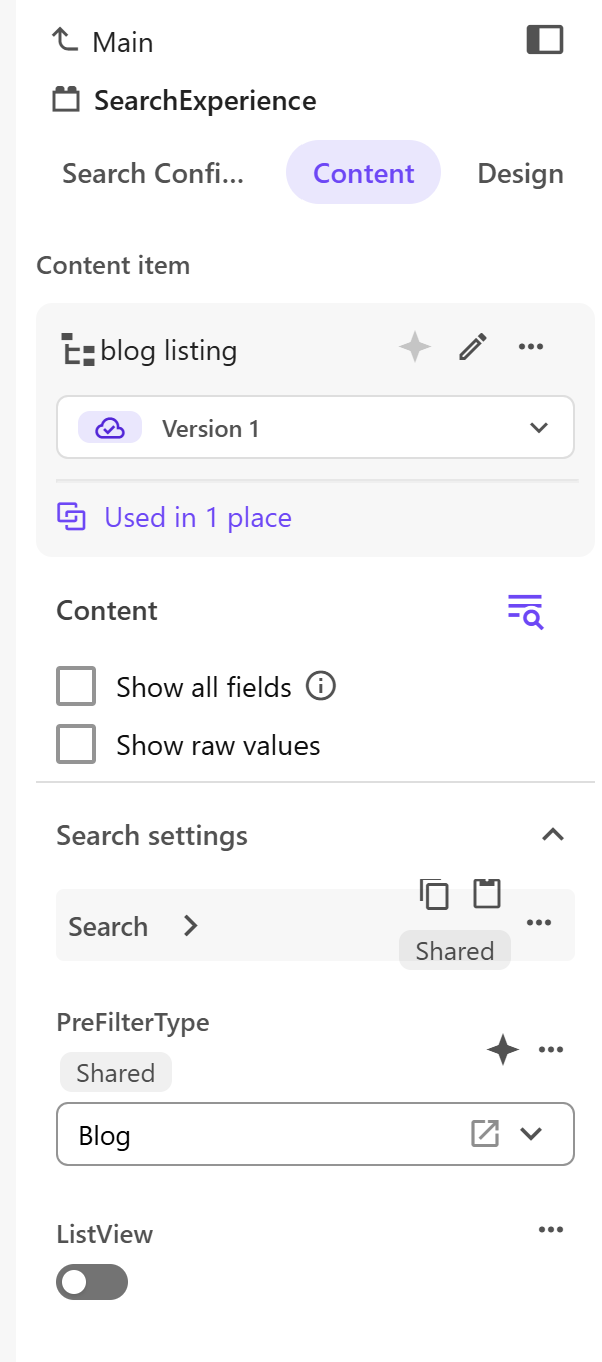
We added a preFilterType field on the SearchExperience datasource template. It points to an item in our type folder — the taxonomy structure that defines content types like Case Studies, Blogs, and News. When an author sets it on a search component instance, that type is sent through as part of the facet payload (see the preFilterType field in the request above), and Sitecore Search narrows the result set to that type before anything else is applied — keyword, other facets, pagination.
For global search, we need the facet filters shown on the left side, so visitors can narrow results down to a specific industry or topic:
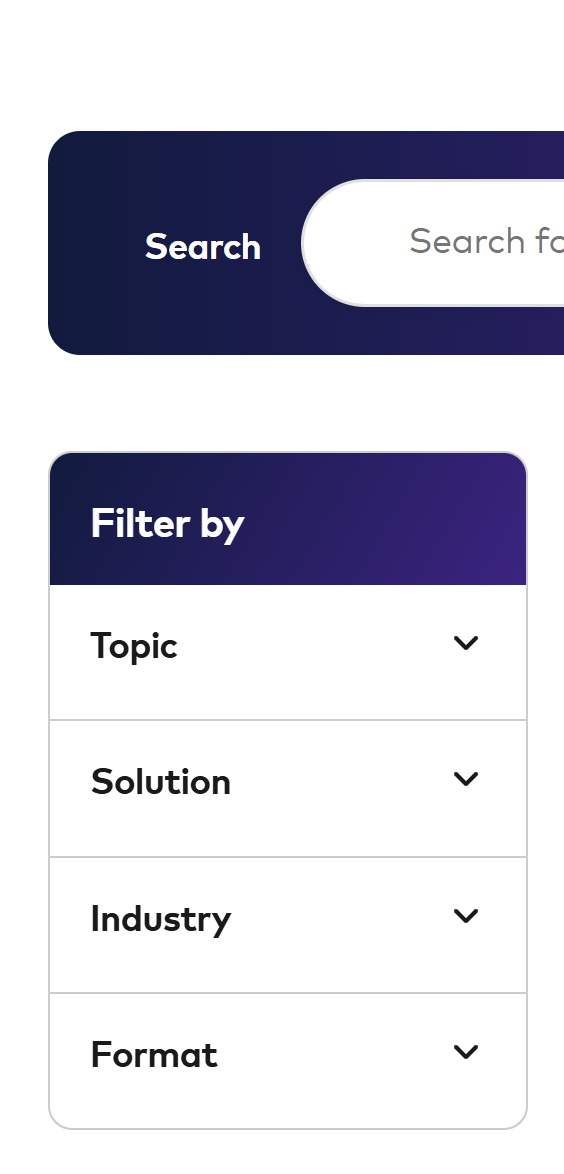
But for internal search pages, like case studies, where we don't have that many pages, we needed a way to turn the facets off entirely. To do that, we built a component variant that hides the filters.
Alongside it, we added a second boolean field on the same datasource, showListView, so authors can switch a given search component between a list layout and a grid layout without touching code. Small field, but it means the same rendering can serve very different-looking sections of the site, entirely from Pages Builder. Here's what both fields look like on the SearchExperience datasource in Pages:
Working with the Sitecore team, and the rough edges along the way
None of the above would have gone smoothly without a genuinely fast turnaround from the Sitecore team, so it's worth calling out what we actually ran into.
Early on, we hit a case where a newly created index simply wasn't returning sc_url in results. It turned out to be a bug in locale handling that had just been introduced — we reported it, and it was fixed within the same conversation, with a quick retry confirming the field was back.
The source configuration was limited in the beginning — there was no way to use facets or filtering at all. We discussed this with Sitecore, and we ended up with a new source field type called Tag, which takes comma-delimited values from a meta field on the page and turns them into an array of facet values. For example, <meta name="industry" content="IT and Technology, Telecommunications"> turns into a source field of type Tag with two values.
We also asked directly whether the API natively supports search suggestions or autocomplete. At the time it didn't — it's on the roadmap — which is part of why the typeahead here is hand-rolled against a dedicated suggestion index rather than a built-in feature.
Another limitation at the time: there was no way to edit an already-created source. If you had a typo or missed a field, you had to re-create the index from scratch. There were days I had to reconfigure an index five or six times while fine-tuning it. Combined with the quota limit below, that meant deleting an existing source just to make room to set up a new one.
Search sources are capped per organization, not per environment. The initial limit is 8 per org (4 production, 4 non-production). If you're running separate indexes for site search, resources, and suggestions across dev, stage, and production, you will hit that ceiling faster than you'd expect. The good news is that it's a soft limit — a support request can raise it to 20 (10 production, 10 non-production) at no extra cost. If you know you'll need more sources across environments, it's worth raising that request early rather than discovering the cap mid-project.
And one more: after everything was set up and working, we enabled additional languages — which meant re-creating the indexes once again. That re-creation carries its own follow-on cost: you then have to go through every page where the search component is placed and update it to point at the new search source.
One more thing worth knowing if you're relying on a Site Source: sitemap-based crawl scheduling has a 12-hour minimum. If you publish a new page and want it to show up in search results right away, don't wait for the scheduled crawl — go trigger a manual reindex instead.
Thanks to Theofanis Matsoukas and the Sitecore Search team for the quick fixes and for walking through the Site Sources rollout and quota increase with us — it made an otherwise fiddly setup, across several search sources and environments, a lot less painful. If you're evaluating embedded search or integrated search in Sitecore AI, Search Sources is worth the learning curve.
Key takeaways
If you're about to start with Sitecore Search Sources, here's what I'd tell myself on day one:
- Get your source design right before you build against it. Sources can't be edited once created — a typo or missed field means a full re-create, and every page using that source needs to be repointed. Plan your fields, facets, and languages up front rather than iterating live.
- Request your quota increase early. The default is 8 sources per org (4 prod, 4 non-prod), shared across environments, not per environment. If you're running separate site and suggestion indexes across dev, stage, and production, ask Sitecore to raise it to 20 before you hit the wall mid-project.
- Don't rely on the scheduled crawl for anything time-sensitive. Sitemap-based crawls have a 12-hour minimum. Trigger a manual reindex when you need a newly published page to show up in results right away.
- Split your indexes by job, not by convenience. A lean suggestion index for typeahead and a full site index for faceted search each want different fields and different performance characteristics — don't force one index to do both.
- Expect to outgrow the SDK hooks quickly. They're a fast way to get search running, but faceted filtering, custom suggestion endpoints, and caching control mean you'll likely end up calling the Search API directly, proxied through your own routes.
- Talk to the Sitecore team directly. This is an early-stage feature — several of the capabilities we needed (the Tag field type, Site Sources, quota increases) only exist because we asked. Don't assume a limitation is permanent; it might just not be documented yet.