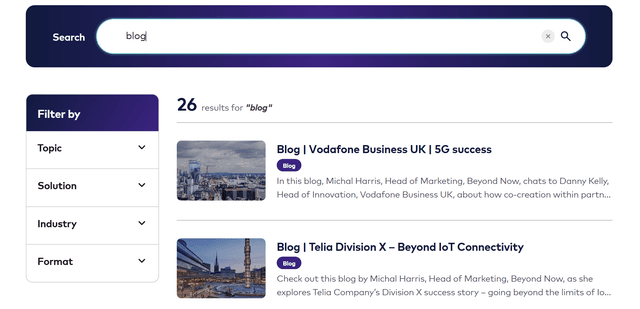
I can imagine every lead developer in my situation. You end up being the one who knows how everything works—the whole project, how we built it, why we did it that way. Or at least it feels that way. Then the messages start. Which component do I use for the heading? Is there a button for this? What's this component called again? Can I add an image here? They pour in from QA team, PMs, devs, content folks. Different channels, different times, the same kind of question. Your day turns into a relay: you're not so much writing code as you're playing the role of human knowledge base. Context-switching, digging through docs or your memory, answering again and again. You get distracted. You can't focus. The real work—the one only you can do—keeps getting postponed.
That was my reality. So I asked myself: what if that knowledge lived somewhere that could answer back, in plain language, without me?
The idea didn't come in a meeting. It came during two weeks off around Christmas. No stand-ups, no Teams, no "quick question." Just time to think. By New Year, I had a clear picture: a small assistant that would answer component questions from the actual documentation—so the team could ask it instead of me. I built it. I'm calling it my New Year's gift to the PMs—and to myself, so I could finally get back to the job I was hired for.
The raw material was familiar: a huge Sitecore component library—dozens of components, each with variants, content fields, and quirks—and teams constantly asking things like "Which component do I use for downloadable docs?" or "What's the difference between the two FAQ variants?" Documentation lived in different places. Finding the right answer took time and a lot of tribal knowledge.
So I decided to build a small RAG-based assistant that lets people ask in plain English and get a clear answer, grounded in the actual component docs. Here's how I thought about it—especially how I created chunks and retrieved the right bits so the AI could actually help instead of guess.
What I was aiming for
I didn't want a chatbot that invents answers. I wanted one that only answers from the real documentation. That meant: turn the component knowledge into searchable "chunks," store them in a vector database, and for every question pull the most relevant chunks and hand them to the model as context. No context, no answer—so the model stays on script.
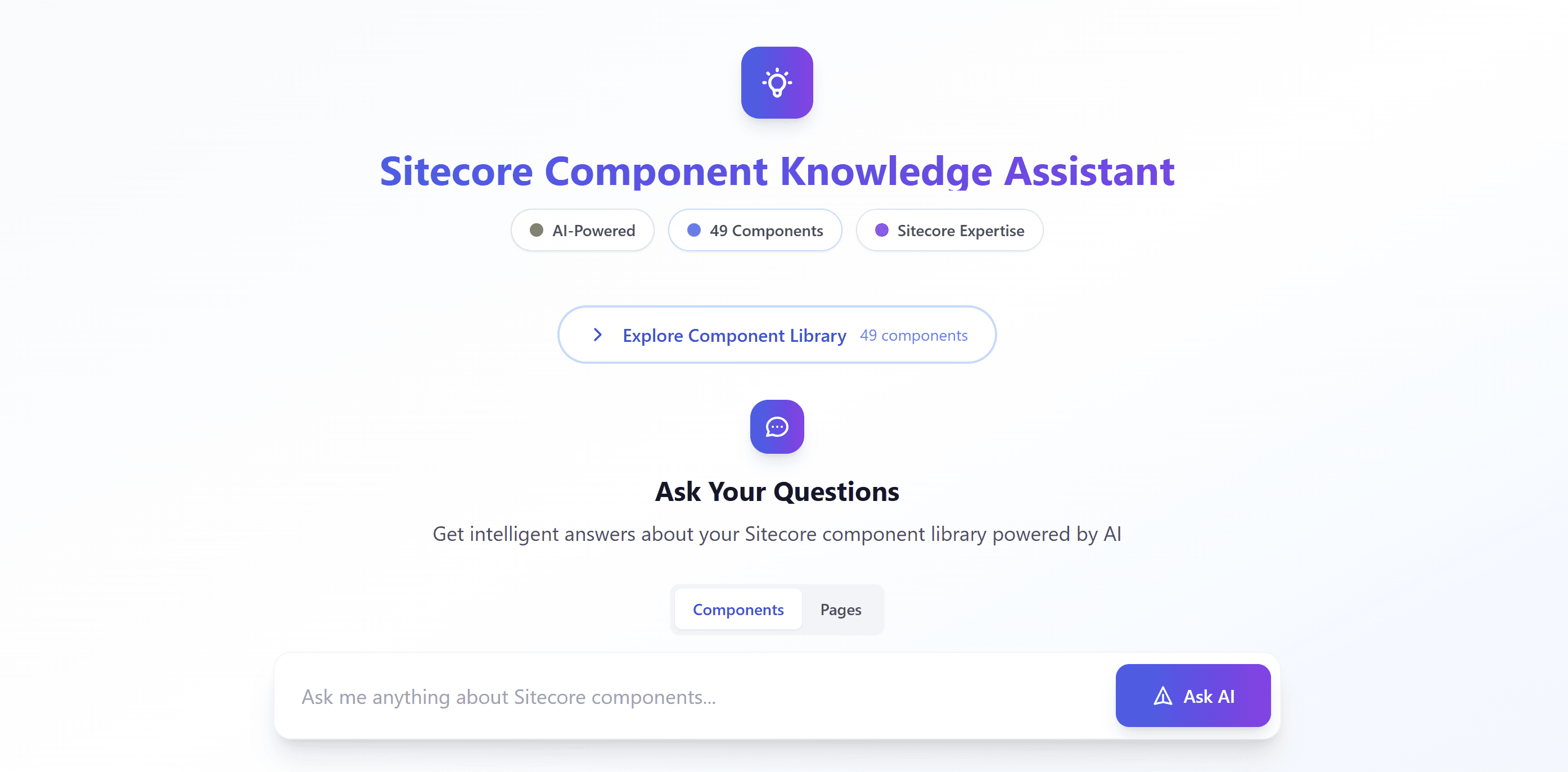
On the website, I aimed for a simple page where you can browse the component set, switch between "components" and "pages" knowledge, type a question, and get an answer plus the source chunks so you can trust it (or correct me). That's the experience; the interesting part was how I prepared and retrieved the data. The two modes do different jobs: Components is for what a component is, how to use it, its variants and fields—"Which component for headings?", "What are the FAQ variants?". Pages is for where you can see it—"Where can I see the DocumentList?", "On which pages is the HeroBanner used?". One mode feeds you component docs; the other feeds you page-level knowledge so the assistant can answer "where is this used?" without mixing the two.
How I built it: Vercel, Upstash Vector, and OpenAI
Next.js on Vercel—so I didn't run any servers. When someone asks a question, a serverless function handles it: it queries Upstash Vector (serverless too, REST API) for the nearest chunks by embedding similarity, takes the top 5, and sends them plus the question to the OpenAI API. The model is told to answer only from that context. I return the answer and the source chunks so people can see where it came from. One request in, one response out.
Why chunking was the first real decision
Before writing a single line of retrieval code, I had to decide what a "chunk" actually is. The content wasn't one big doc. I had overviews, variant descriptions, content fields, properties, QA rules, and role-based knowledge (editor how-tos, architect patterns, dev notes). I could have thrown whole components in as single blobs, but I knew that would make retrieval noisy—long chunks with mixed topics don't match specific questions well. So I decided to split by meaning.
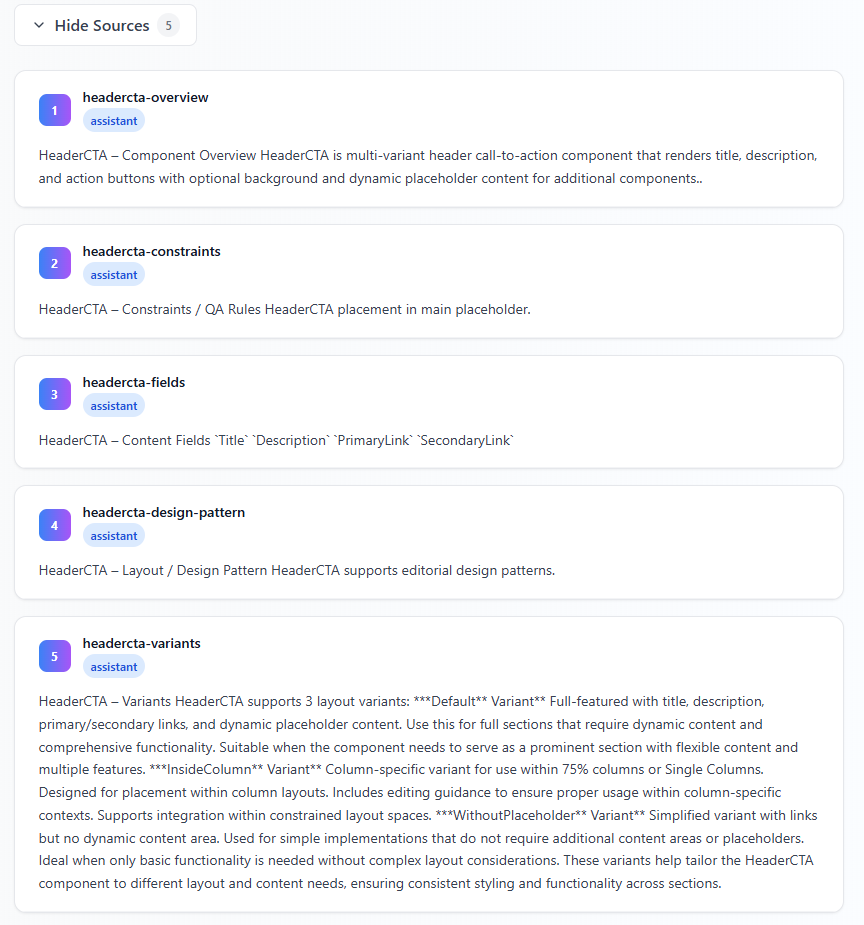
One chunk = one idea. Each chunk is a short, self-contained piece—a few sentences or a short list. That way, when someone asks "What are the FAQ variants?", the vector search can surface just the FAQ variant chunk instead of a giant FAQ megachunk. I tried both ways in my head: one big blob per component felt simpler to build, but I'd already seen other RAG systems drown the model in irrelevant paragraphs. I decided I'd rather have many small, focused chunks and let the vector search pick the right ones.
I also had to decide on structure. I use a consistent pattern in the text itself (e.g. "ComponentName – Section") so both humans and the system can tell what a chunk is about. That wasn't just for the machine—when I debug "why did this chunk get retrieved?", I want to read the chunk and immediately know which component and which section it is. And I attach metadata to every chunk: component name, type (e.g. assistant vs. pages content), content type, and tags. That metadata doesn't just sit there—I use it when I search. For example, when you're in "Components" mode I only consider component chunks; when you switch to "Pages" I filter to page-related content. So chunking wasn't only about size; it was about having enough structure to filter later. I decided early that I'd rather over-tag than under-tag, because I could always ignore a filter, but I couldn't invent one I hadn't stored.
I had two main sources: a big curated list of pre-written chunks (overview, capabilities, fields, variants per component) and a set of per-component JSON files with use cases, how-tos, and Q&A. For the JSON, I flattened each "knowledge chunk" into a single text plus metadata. I didn't try to be clever with overlap—I'd rather have a bit of redundancy than miss a good match. In practice, that meant I ended up with many small, focused chunks instead of a few huge ones. Some components have a handful of chunks; others have dozens. I was okay with that. Uniform chunk count wasn't the goal; retrieval quality was.
One thing I didn't do: I didn't use a fixed character or token limit per chunk. Some chunks are two sentences; others are a short bullet list. I cared more about "one idea" than "exactly 300 tokens." That made the source material easier to write and curate, and the vector model seems to handle the variation fine. So far I haven't regretted that.
What I decided about metadata and filtering
I knew from the start that I'd have more than one "kind" of content: component docs for the assistant and later page-level or project-specific content. If I threw everything into one big pile and only did semantic search, I'd get cross-talk—e.g. a question about "FAQ component" pulling in a random page that mentioned FAQ. So I decided that every chunk would have a type (and eventually other filters). When the user is in "Components" mode, I only query chunks where type is assistant. When they switch to "Pages," I only query page-related types. That way the vector search runs on a subset of the index, not the whole thing. I also added things like component name (normalized, lowercase) and tags so I could, if I wanted later, narrow by component or by tag. I didn't need that for the first version, but I'm glad I had it when I added more content—filtering by metadata first, then ranking by similarity, turned out to be the right mental model.
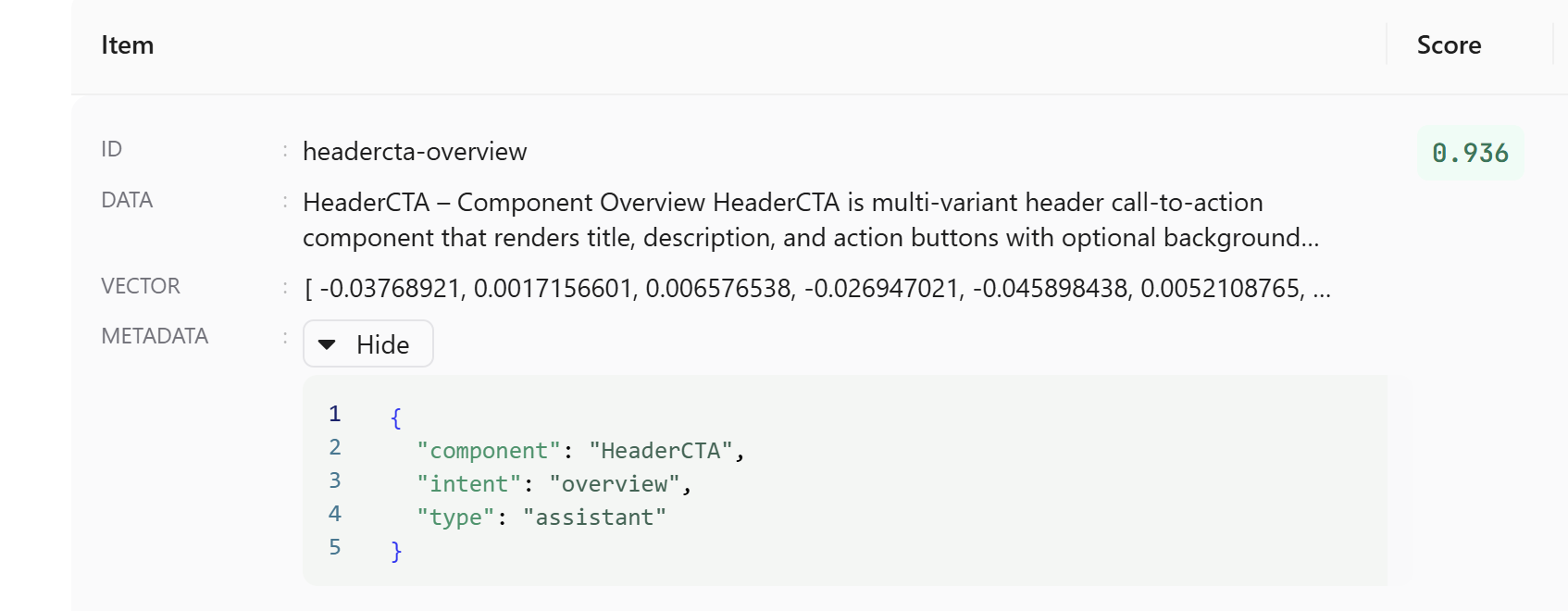
I store the type, component name, content type, query intent, filename, and a few other fields on every chunk. When I ingest chunks (e.g. from curated content or scripts), I always send that same shape. Consistency there made it possible to change filters later without re-ingesting everything.
How I handled retrieval: how many, and which ones?
Once the chunks were in the vector store, the next decision was: how many do I fetch, and how do I use them?
I ask the vector DB for the top 10 by semantic similarity to the user's query, but I filter first by metadata (e.g. type = assistant or component-manual when in Components mode). So I'm not searching the whole corpus every time—I narrow by "components" or "pages," then let the vector search rank within that. That kept answers on-topic and avoided leaking page content into component questions and vice versa. I picked 10 as a reasonable candidate set: enough to have a chance of covering different angles of the question, but not so many that I'd blow the context window or dilute the signal.
Then I trim to the top 5 and pass only those to the model. Why 5? I tried more and hit token limits and noisier answers; fewer and I sometimes missed the one chunk that had the right detail. Five was the sweet spot for my chunk sizes and my model's context window. So the pipeline is: filter by mode → get top 10 by score → optional post-filter → take top 5 → send to the model. I didn't tune that number with a fancy experiment; I just tried 3, 5, 7, 10 and settled on 5. You might find a different number works better for your chunk sizes and model. The important part for me was having a clear rule: never send the whole result set to the model, always cap it. That way token cost and noise stay under control even when the index grows.
I don't rewrite the user query for retrieval. I send it as-is to the vector API. I considered adding a step that rephrased the question or expanded it into keywords, but I decided to keep the pipeline simple and let semantic search do the work—users phrase things in different ways, and the embeddings handled that well enough. So: same question text for both retrieval and for the prompt. If I ever hit cases where that's not enough, I might add a lightweight query expansion, but so far I haven't needed it.
Takeaway: I filter by metadata first, then rank by similarity. I fetch a small candidate set (10), keep the best 5 for the prompt, and keep the user's wording. It's good enough and keeps the system easy to reason about.
How I tie it together in the prompt
I combine those top 5 chunks into one context string, add a short system prompt that says "answer only from this context, focus on variants and usage," and send the user's question plus that context to the model. I keep temperature low so answers stay consistent and factual. The UI shows the answer and the source chunks so users can see exactly where the information came from. I decided early that I'd always show sources—no "trust me" answers. If the model says something, you can click and see which chunk it came from. That also made it easy for me to spot when retrieval was wrong (right question, wrong chunks) versus when the model was drifting (right chunks, wrong answer). So the whole story is: chunk by idea and tag everything, then filter by intent (components vs. pages), retrieve a small set, and feed only the best few to the model. No fancy query rewriting, no huge context windows—just clear chunking and retrieval so the AI has the right material to work with. That's what made my Sitecore component assistant actually useful instead of just impressive.
What I'd do the same (and what I'd tweak)
I'd stick with "one chunk = one idea" and rich metadata. I'd stick with "filter first, then rank." I'd stick with showing sources. Those three choices saved me a lot of debugging and made the system predictable.
If I were to extend it, I'd consider: slightly smaller chunks for components that have a lot of variants or fields (so "FAQ – Variants" might become "FAQ – Default variant" and "FAQ – WithFilters variant" as separate chunks). I might also add a simple "did we find anything good?" check—if the top result has a very low score, maybe show "I couldn't find a good match" instead of forcing an answer from weak context. I haven't done that yet, but it's on my list.
One thing I deliberately skipped: query expansion or synonym injection. I could have turned "FAQ" into "FAQ, frequently asked questions, accordion" before sending to the vector DB. I decided to try without it first. In practice, the embeddings already capture that kind of variation, and keeping the query unchanged made the pipeline easier to debug. If I ever see consistent misses on a theme, I might add a small synonym layer, but it's not a priority.
A note on adoption: training the team to use it
Building the tool was one thing. Getting people to use it was another. At first the PMs kept doing what they'd always done—pinging me or each other, opening the same PDFs and Excel sheets, chasing answers in five different places. I had to nudge them. More than once I asked: Did you ask the tool? Not in a sharp way, just a reminder that there was now one place that could give them a short, direct answer. Over time they started trying it. Then they started relying on it. Now they go there first. One place for everything. The right slice of information, no digging through PDFs or spreadsheets or scattered docs. That shift—from "ask the lead" to "ask the tool"—was the real win. The assistant only earns its keep when people actually use it, so a bit of gentle training and repetition was part of the deal.
Closing thought
If you're building something similar on top of Sitecore or another content platform, the same idea applies: invest in how you slice and label your content, and in how you filter and trim before the model sees it. I did the boring work up front—chunking and metadata—and the rest felt like plumbing. The assistant is only as good as what you feed it, so I decided to feed it small, labeled, filterable pieces. So far, that decision has paid off.